
The short answer
- Handing out printed copies? A QR code helps at a career fair, interview or networking event, if it opens something the page can’t show, like your portfolio or resume website.
- Applying online or emailing a PDF? Skip it. People reading on a screen click links, and you should assume resume-parsing software won’t read the code.
- How big? At least 1 inch (2.5 cm) wide, with a white border, and the link printed in text next to it. Long links need bigger codes: in our simulation, a LinkedIn share link with tracking codes needed 1.25 in. The maker below strips those codes first.
- Which kind? A free static code. “Dynamic” codes from QR websites can stop working when a trial or plan ends. Make one below, no account needed.
Most advice says “make it about an inch” and stops there, without saying why or what a long link changes. So we built a scan simulation: codes printed on virtual paper at seven sizes, photographed by a model phone camera at four distances, with the blur and tilt of real hands, for 13,120 decode attempts. The results are below, with a free QR maker that uses them to check the size for your link.
Do you need a QR code on your resume?
If it will be read on a screen:
Skip the code. Use a clickable link.
Few people scan a code on their own screen. Put a short, readable link in your contact line, make it clickable, and check it works in the exported PDF. Our guide to sharing your resume as a link covers which link to use.
If it's on paper and the code opens something extra:
Add one. This is what resume QR codes are for.
Print it at least 1 inch wide in the top right corner, with a caption like “Scan for my portfolio” and the address underneath. Use the QR maker below to check the size for your link.
If it's on paper and the code opens LinkedIn or the same resume:
Optional. It saves typing, but it won't add much.
A code that opens your LinkedIn spares a recruiter from typing your name into search. Use your clean profile link (linkedin.com/in/yourname), not a share link full of tracking codes, and print the address next to it.
If it's on paper and you don't have a link yet:
Leave it off for now.
A code with nothing worth opening behind it takes space from your resume. If you want one for the next career fair, the quick fix below gets you a link first.
When a QR code on a resume helps (and when it doesn’t)
A QR code is a shortcut from paper to a web page. It only helps where there’s paper. If a recruiter is holding your printed resume, the code saves them typing your address into a phone. On a laptop screen, it’s a small square they can’t click.
Career centers still tell students to bring several printed copies to a career fair (Kansas State, CSULB), and some interviewers print your resume before you meet. That’s where a code earns its space: career fairs, in-person interviews, networking events and mailed applications, anywhere your resume changes hands as paper.
Where it does nothing:
- Applicant tracking systems. Uploaded resumes are read as text. None of the parser documentation we found mentions decoding QR codes, and Greenhouse lists graphics as a cause of failed or partial parses. Treat the code as invisible to software, and never put information only in the code.
- PDFs read on screen. Android’s Circle to Search can read a code on your own screen, but there’s little reason to when the link can be tapped.
Some people won’t scan a code at all, and they have a reason. The FBI warned in 2022 that criminals swap or alter QR codes to send people to malicious sites, and told people to check the address after scanning. Printing your link next to the code answers that: a cautious reader can see where it goes, or type it.
How big should a QR code be on a resume? We ran 13,120 simulated scans
The answer depends on your link, not just the paper. A QR code is a grid of small squares (modules). The more characters in your link, the more modules the code needs, so at the same printed size each square gets smaller and harder for a camera to see. Denso Wave, which developed the QR code and announced it in 1994, publishes the grid sizes: 21×21 modules for the smallest code, up to 177×177.
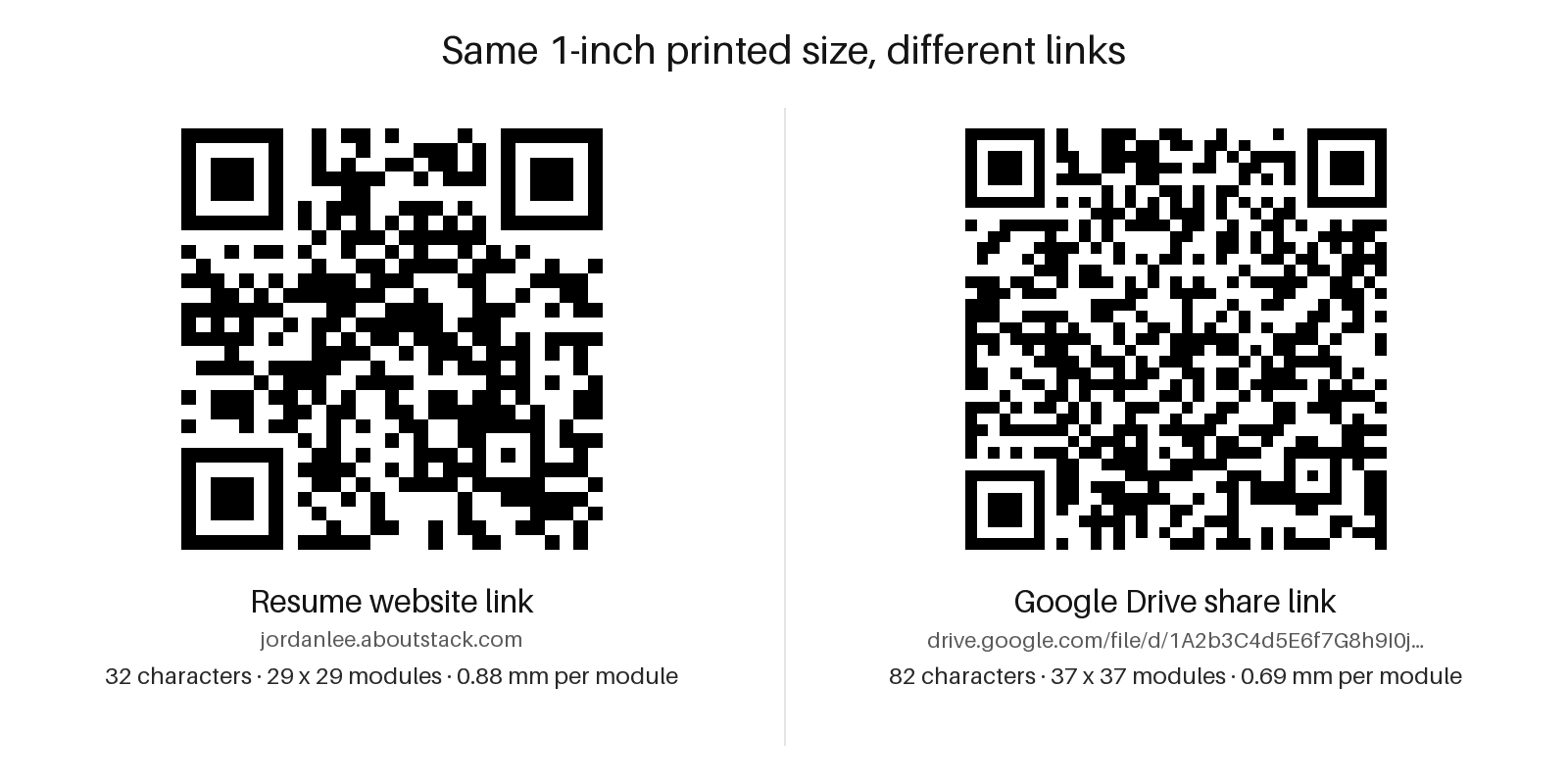
We tested four realistic links: a resume website (https://jordanlee.aboutstack.com), a clean LinkedIn profile URL, a LinkedIn share link with its tracking codes still attached, and a Google Drive share link. Character counts include the https://. Each link was printed at seven widths from 0.5 to 2 inches and “scanned” from 15, 20, 30 and 45 cm (6 to 18 inches), 40 times per combination.
- 0.75 in smallest passing size for a short resume-site link at 30 cm 32 characters, 29×29 grid
- 1 in for a Google Drive share link 82 characters, 37×37 grid
- 1.25 in for a LinkedIn share link with tracking codes 127 characters, 49×49 grid
- 7.5% of scans worked at half an inch for the short resume-site link at 30 cm (12 in)
Scans that worked at about a foot (30 cm), by printed width
| Group | Resume site (32 chars) | LinkedIn (clean) (37 chars) | LinkedIn share link (127 chars) | Drive share link (82 chars) |
|---|---|---|---|---|
| 0.5 in | 7.5% (3 of 40) | 32.5% (13 of 40) | 0% (0 of 40) | 0% (0 of 40) |
| 0.6 in | 50% (20 of 40) | 70% (28 of 40) | 0% (0 of 40) | 2.5% (1 of 40) |
| 0.75 in | 97.5% (39 of 40) | 95% (38 of 40) | 0% (0 of 40) | 55% (22 of 40) |
| 1 in | 100% (40 of 40) | 100% (40 of 40) | 35% (14 of 40) | 97.5% (39 of 40) |
| 1.25 in | 100% (40 of 40) | 100% (40 of 40) | 100% (40 of 40) | 100% (40 of 40) |
| 1.5 in | 100% (40 of 40) | 100% (40 of 40) | 100% (40 of 40) | 100% (40 of 40) |
| 2 in | 100% (40 of 40) | 100% (40 of 40) | 100% (40 of 40) | 100% (40 of 40) |
Under an inch, link length decides whether the code works. At 0.75 inches the short resume-site link scanned in 39 of 40 attempts and the Drive link in 22. At 1 inch the LinkedIn share link, with its utm_ tracking codes, managed only 35%. A clean profile address (https://www.linkedin.com/in/jordanlee) is 37 characters instead of 127, and needs a 29×29 grid instead of 49×49.
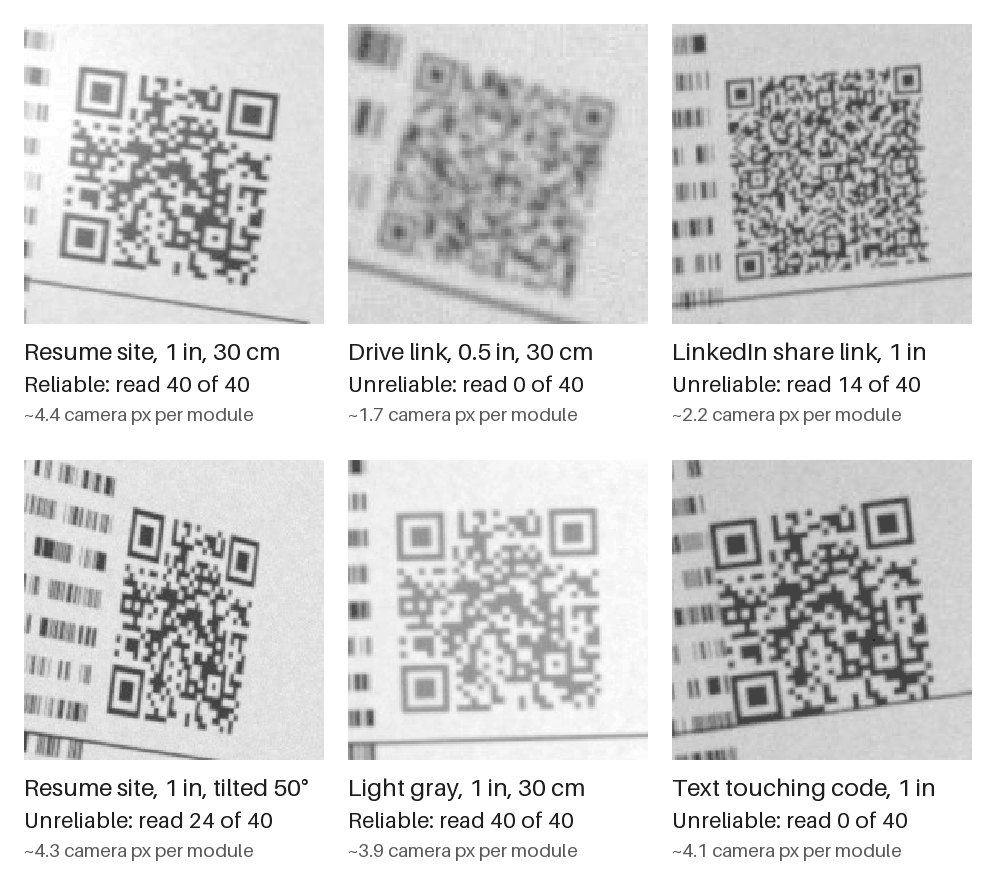
A camera needs about three pixels per square. In our model, the stricter decoder became reliable at 2.88 camera pixels per module, which at 30 cm means squares of about 0.618 mm. The size you need grows in step with distance, so a code that passes at 30 cm can fail at 45 cm (18 in): at 1 inch, the short link dropped to 85%.
One inch is the size to aim for, and 1.25 inches is safer if you have room. At 30 cm, 1 inch passed for every link except the LinkedIn share link. With a cheap 150 dpi printer, 1 inch was also the smallest size that passed for the short link. With a lower-resolution 720p camera feed, the short link needed 1.25 in and the Drive link 1.5 in.
The smallest size that passed, by link and distance:
| Link | 15 cm / 6 in | 20 cm / 8 in | 30 cm / 12 in | 45 cm / 18 in |
|---|---|---|---|---|
| Resume site, 32 chars | 0.5 in | 0.6 in | 0.75 in | 1.25 in |
| LinkedIn, clean, 37 chars | 0.5 in | 0.5 in | 0.75 in | 1.25 in |
| LinkedIn share link, 127 chars | 0.75 in | 1 in | 1.25 in | 2 in |
| Drive share link, 82 chars | 0.5 in | 0.6 in | 1 in | 1.5 in |
Sizes right at the pass mark are within noise. When we re-ran the short link at 0.75 inches and 30 cm in our other experiments, it read in 88 to 92% of attempts, just under the bar.
The “10:1 rule” is roughly right for short links and wrong for long ones. QR vendors often say a code should be one tenth of the scanning distance. We couldn’t find where the rule comes from (it isn’t in Denso Wave’s guidance or the ISO standard’s listing), so we checked it. It held in 12 of 16 link-and-distance combinations: for every link up to 82 characters, but never for the 127-character share link. With a 720p camera feed it held in only 5.
How we ran the simulation, and its limits
This is a simulation. No phone, printer or paper was used. Each code was rasterized onto virtual paper at 300 dpi (150 dpi in a cheap-printer run), next to resume text and a rule line like a crowded header. A model of a phone’s main camera, analyzing a 1920×1080 preview frame (1280×720 in a sensitivity run), “photographed” it with hand-held variation in distance, tilt (0 to 20°) and rotation, plus lens and focus blur, hand shake, uneven light, glare, sensor noise and JPEG compression.
Each attempt was a 5-frame burst (a sixth of a second of video), counted as a success if any frame decoded to exactly the right link. We used two open-source decoders, zxing-cpp (a C++ port of the ZXing library) and OpenCV’s QRCodeDetector, and report the lower of their two rates. A third, WeChat’s neural-network scanner, was recorded but never used for headlines. Everything is seeded: a re-run gives byte-identical results.
Limits:
- Real phones may do better or worse. Better: iPhone Camera, Google Lens, auto-zoom and macro switching weren’t tested, and people hold the camera on a code for longer than our 5-frame burst. Worse: older phones with a 720p feed, glossy or creased paper, and some recent phones that can’t focus closer than about 20 cm.
- Several failures come from OpenCV alone. Codes with no white border or inverted colors failed in OpenCV every time but read fine in zxing-cpp, so read those as “some scanners fail”, not “phones fail”.
- Colors were reduced to brightness. Faded toner and real paper weren’t modeled, so the light-gray result is probably optimistic.
- 40 attempts per condition means differences of under about 10 points near a threshold are noise.
Download the data (CSV), with one row per condition, each decoder’s count and a 95% interval, or the script that produced it.
What should your resume QR code link to?
Something the paper can’t show. A code that opens the same one-page resume the recruiter is already holding gives them a second copy, not a reason to scan. These are the options, in the order we’d pick them:
Static vs dynamic QR codes: which one for a resume?
Use a static code. It’s free, it needs no account, and it never expires. A static code holds your link itself, so it works for as long as the page it opens is online.
A “dynamic” code holds a short link to the QR vendor’s server, which redirects to your page. You can change the destination later and count scans, which is why many QR websites recommend it. But it only works while the vendor keeps redirecting, and their own help pages say when that stops:
| Vendor (their own help page) | What happens to dynamic codes |
|---|---|
| QR Code Generator by Bitly | Deactivated when the 14-day trial ends. After a cancellation, they keep working for the paid period plus 30 days, then send scanners to a service page |
| The QR Code Generator | Become inactive when the subscription expires (after a trial, up to two may stay active with ads) |
| Bitly (Bitly Codes) | Bitly says its codes don’t expire |
So it depends on the vendor, and a printed resume can sit in a recruiter’s folder for months. To change what your code opens later, point a static code at a page you control, like your own resume website, and update the page instead.
Where to put a QR code on your resume
Top right, next to your contact details, at least 1 inch wide, with a caption and the link under it. That’s where people look for how to reach you, out of the way of your experience.
Do
- Add a short caption that says what opens: Scan for my portfolio
- Print the link in text under or beside it, like
yourname.aboutstack.com - Keep a white border of about four squares on every side
- Use one code, pointing at your single best link
- Keep the same link as typed text in your contact line for the software that reads uploads
Don’t
- Let text, lines or page borders touch the code
- Print it under 1 in (2.5 cm), or under 1.25 in (3.2 cm) for a long link with tracking codes
- Put a logo in the middle or print it white on a dark background
- Put your contact details in a header text box or footer, which can cause partial parses, according to Greenhouse
The white border is part of the code. The QR standard calls for a margin of four modules on every side. In our simulation, a 1-inch code with a four-, two- or one-module border scanned 100%, 100% and 98% of the time. With resume text right up against it, OpenCV’s decoder failed every attempt (0%), though zxing-cpp still read it.
Can a resume QR code be in color, or have a logo?
Dark colors on white are fine. Logos and inverted codes aren’t worth the risk. A camera only needs the squares to be clearly darker than the background:
Design choices, 1-inch code at 30 cm
| Group | Scans that worked |
|---|---|
| Black on white | 100% (40 of 40) |
| Blue #2451f0 on white | 100% (40 of 40) |
| White on black | 0% (0 of 40) |
| Logo in the middle, standard (M) | 0% (0 of 40) |
| Logo in the middle, high (H) | 87.5% (35 of 40) |
| Tilted 50° | 60% (24 of 40) |
- Color: blue #2451f0 decoded as well as black. So did light gray, which tells you our model is generous about contrast (real toner and paper aren’t), so stick to dark colors. White on black failed every time in OpenCV, though zxing-cpp read it, so some scanners may struggle.
- Logos: with standard error correction, a center logo broke the code for every decoder on every attempt. With the highest level (H) it reached 87.5%, still under our 95% pass bar, and the code grew from 29 to 33 modules.
- Extra error correction backfires. Level H needed a 49×49 grid for the Drive link and scanned 75% at 1 inch, against 100% for standard M, which Denso Wave says is the most common level.
- Angle: up to 35° of tilt made no difference. At 50° only 60% worked, so hold the page roughly square to the phone when you test it.
How to make a QR code for your resume (free)
Paste your link below. The maker runs in your browser and sends nothing anywhere. It strips tracking codes (a shorter link makes bigger squares), builds a static code with the white border included, and checks your print size against our simulation.
Make a QR code for your resume
Runs in your browser. Nothing is sent anywhere. Static code: it never expires and needs no account.
Encoded:
The QR maker didn't load. Any free static QR code generator works; print the link next to the code too.
Then put it on your resume:
- Download the SVG for Word, Google Docs or Canva (it stays sharp at any size), or the PNG if your editor won’t take SVG. The PNG is already set to print at the size you picked.
- Insert it as a picture in the top right of the page, not inside the header or footer area. Set its width to the size you chose, with the aspect ratio locked, and measure the code, not the white border.
- Add the caption next to it, and the link in text if it isn’t already printed under the code.
- Print one copy and scan it with two different phones from about a foot away: an iPhone’s Camera app (it has read QR codes since iOS 11, in 2017; Apple’s steps) and an Android camera or Google Lens (Google’s steps). If either hesitates, print it bigger.
- Check where it lands. Open the page the scan opens and make sure it’s public, current and readable on a phone.
No short link yet? A quick fix
A QR code is only as good as the page behind it. If all you have is a long Drive link, any of these gets you something shorter and better to scan:
| Option | Cost | Example link | Good for |
|---|---|---|---|
| LinkedIn profile | Free | linkedin.com/in/yourname |
Networking, if your profile is current |
| Google Sites or Carrd | Free, paid plans for extras | sites.google.com/view/yourname or yourname.carrd.co |
A simple page you design yourself |
| GitHub Pages | Free | yourname.github.io |
Developers comfortable with Git |
| AboutStack | 7-day free trial, no card needed, then $5.99/month | yourname.aboutstack.com |
A short resume-site link that opens your latest resume, and stays the same when you edit it |
Before your next career fair, try the one-foot test: print the page, hold it about a foot from the phone, and scan it with someone else’s phone. If it opens your page in a second, it’s ready. If it hesitates, make the code bigger or the link shorter.
QR Code is a registered trademark of DENSO WAVE INCORPORATED.
FAQ
Should I put a QR code on my resume?
Only on copies that will be printed, like the ones you hand out at a career fair, an interview or a networking event, and only if it opens something the paper can’t show, like your portfolio or resume website. On a PDF that’s read on a screen, use a clickable link instead.
Can an applicant tracking system (ATS) read a QR code?
Assume it can’t. None of the parser documentation we found mentions decoding QR codes, and Greenhouse lists graphics as a cause of failed or partial resume parses. Always type the same link as text too.
How big should a QR code be on a resume?
At least 1 inch (2.5 cm) wide, plus its white border. In our simulation at about a foot (30 cm), a short resume-site link first passed at 0.75 in, but only just: repeat runs of the same setup scored 88 to 92%. A 82-character Drive link needed 1 in, and a 127-character LinkedIn share link needed 1.25 in. Shorter links make bigger squares at the same size.
Where should I put a QR code on my resume?
In the top right corner, next to your contact details, with a short caption (“Scan for my portfolio”) and the address printed under it. Keep a clear white border of about four squares around it, and don’t let text or lines touch it.
Do QR codes on resumes expire?
A static code never expires. It holds the link itself, so it works as long as the page it opens is online. “Dynamic” codes from QR websites go through the vendor’s server, and some vendors, including QR Code Generator by Bitly, say theirs stop working when a free trial or paid plan ends.
Should I use my LinkedIn QR code on my resume?
It’s a reasonable free choice. The LinkedIn app gives every member a QR code for their profile, under the QR icon in the search bar (LinkedIn Help). Check the profile is current first, because that’s what the scan opens, and print your LinkedIn address next to it.
Can I add a QR code to a resume I send as a PDF?
You can, but it rarely helps. Someone reading on a laptop would need a phone to scan their own screen, and on a phone it’s awkward. In a PDF, a short clickable link does the job better. Keep the code for the printed version.
Can my resume QR code be in color or have a logo in the middle?
Dark colors on white are fine: a medium blue (#2451f0) decoded as well as black in our test. Avoid white-on-dark codes, which one of our two decoders never read. Skip the center logo: with standard error correction, every decoder failed on every attempt.
Sources
- Simulated scan test: 13,120 attempts across 328 conditions, Oct 22, 2026 (AboutStack, data download) Our dataset. One row per condition, with attempts, decodes, the success rate, a 95% interval and each decoder’s count. A simulation, not a test with physical phones.
- Simulated scan test: the script (AboutStack, Python) The seeded pipeline that produced the data, with every camera and print assumption in the code.
- Denso Wave (qrcode.com): History of QR Code Denso Wave developed the QR Code and announced it in 1994.
- Denso Wave (qrcode.com): Information capacity and versions Versions 1 to 40, from 21×21 to 177×177 modules. More data needs more modules.
- Denso Wave (qrcode.com): Error correction feature Levels L, M, Q and H restore about 7, 15, 25 and 30% of codewords. M is the most common. Higher levels make the symbol larger.
- Denso Wave (qrcode.com): Code area and quiet zone A margin of four modules is required on every side of the code.
- Denso Wave (qrcode.com): Module size Larger modules read more reliably; print as large as the space allows.
- ISO/IEC 18004:2024, QR Code bar code symbology specification The current QR code standard (listing page; the standard itself is paid).
- Greenhouse Support: Unsuccessful resume parse Graphics, image-only files, headers and footers, text boxes, tables and columns can cause failed or partial parses.
- QR Code Generator (Bitly) Help: What happens to my QR Codes after the trial? Dynamic codes made during the 14-day trial are deactivated when it ends and send scanners to a service page; static codes keep working.
- QR Code Generator (Bitly) Help: What happens to my QR Codes if I cancel? After cancelling, dynamic codes keep redirecting for the paid period plus 30 days, then go to a service page.
- The QR Code Generator Help: What happens to my QR codes when my account or trial ends? When a subscription expires, dynamic codes become inactive; after a trial, up to two may stay active with ads.
- Bitly Support: Do Bitly Codes expire? Bitly says its Bitly Codes don’t expire. Expiry depends on the vendor.
- FBI Internet Crime Complaint Center: Cybercriminals tampering with QR codes (PSA, Jan 18, 2022) Criminals swap or alter QR codes to send people to malicious sites; check the URL after scanning.
- Apple Support: Scan a QR code with your iPhone or iPad The Camera app and the Code Scanner in Control Center read QR codes.
- Apple Developer: QR Code Recognition on iOS 11 (Tech Talk, 2017) iOS 11 added QR code detection to the built-in Camera app.
- Google Pixel Camera Help: Scan QR codes The Camera app recognizes QR codes; Google Lens and the Quick Settings scanner work too.
- Android: How do you scan QR codes on Android? Camera app or Quick Settings; Circle to Search can read a code shown on your own screen.
- LinkedIn Help: Using a LinkedIn QR code to connect with members Every member has a profile QR code in the mobile app, under the QR icon in the search bar.
- Kansas State University Career Center: Career fair tips (2024) Bring several printed copies of your resume to hand to recruiters.
- CSULB Career Development Center: Making the most of the job fair Bring multiple copies of your resume, plus extras.