
The short answer
- Sending a PDF? Type
linkedin.com/in/yournameand link it tohttps://www.linkedin.com/in/yourname. In our test of 28 PDFs, that was the only format that was clickable in every viewer and readable by every text extractor. - Got a messy link? Paste it into the free LinkedIn link fixer. It gives you the exact text to type and the link to put behind it.
- Don’t link only the word “LinkedIn” or an icon. They can be clickable, but no text extractor found the URL in any of their PDFs, and a printed copy shows nothing anyone can type.
- Typed the URL with no link behind it? That’s not clickable in Chrome or Firefox. Both only auto-link text that starts with
https://orwww.. - Keep it short and on one line. Claim a custom URL and delete the
?utm_codes the app’s Share button adds. Long URLs that wrapped in a narrow sidebar came out broken. - Applying online? Paste the full
https://link into the form’s LinkedIn field too. 54 of the 60 application forms we checked had one.
Most advice stops at “hyperlink it”. None of the top results we read checks what happens after you export the PDF, so we did. We wrote the same LinkedIn link 7 different ways on one resume, exported 28 PDFs, and checked each one in the PDF engines inside Chrome, Firefox and Apple’s apps, plus 5 text extractors, the tools that pull the words out of a PDF. The results are below, with a free fixer that turns any LinkedIn link into the version that worked.
Which way should you write your LinkedIn link?
If you copied it from the Share button:
Clean it up before it goes anywhere.
Type thislinkedin.com/in/yourname
The ?utm_ codes are LinkedIn’s tracking, not something a recruiter needs, and they more than double the link’s length. In our test the share link wrapped in a sidebar, and a parser pulled out the right profile in 0 of 2 sidebar PDFs. Paste it into the fixer below to get the short version.
If it ends in numbers and sits in a sidebar:
Claim a custom URL first. This one will break.
In a 2.2-inch sidebar, the default URL with its ID wrapped at a hyphen. The text extractors kept it intact in 0 of 2 PDFs, and a parser pulled out a cut-off address like linkedin.com/in/jordan-. A click still worked, but anything reading the text got the wrong profile. A short custom URL fit on one line and passed every check.
If it's going on paper:
Type the short URL. On paper, the text is all there is.
Type thislinkedin.com/in/yourname
Nobody can click paper, so what matters is a short address someone can type. A hidden link behind the word “LinkedIn” or an icon prints as nothing useful. If you also send this file as a PDF, add the link behind the text too: it costs nothing on paper.
If it ends in numbers and sits on one line:
It works, but a custom URL is safer.
On one line, the long default URL was clickable and readable in every PDF. It’s still harder to type and breaks if your template squeezes it. Claiming a custom one takes a minute (steps below). Do it before you send resumes: after a change, LinkedIn only keeps the old link pointing to you for six months.
If it's already short:
Show the short URL and put the full link behind it.
Type thislinkedin.com/in/yourname
Select the text, add a link (⌘K or Ctrl+K in most apps) and paste https://www.linkedin.com/in/yourname. That was the only format that passed every check in our test. Then click it in the exported PDF, not in your editor.
What happens to a LinkedIn link in a resume?
A link in a resume has two layers, and different readers only get one of them. The first is the text on the page, like linkedin.com/in/yourname. The second is the address hidden behind that text, which opens when someone clicks. Word, Google Docs, Pages and Canva all keep them separate: you type the text, then add the link to it.
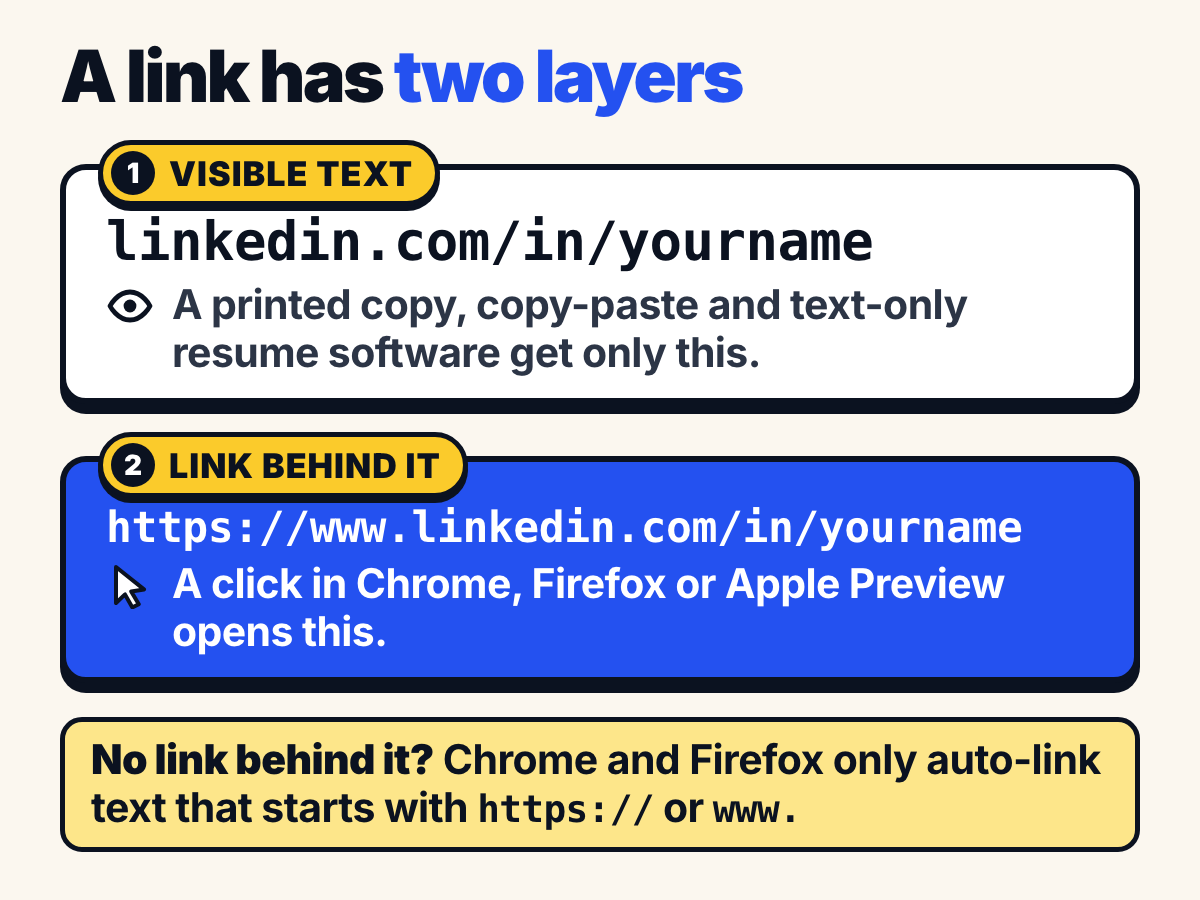
Here’s who reads which layer:
- A recruiter clicking in a PDF viewer gets the link behind the text. If there isn’t one, the viewer can turn text that looks like a web address into a link on its own, but only if it starts with
https://orwww.. We read the source code of the engines in Chrome and Firefox to confirm it. A plainlinkedin.com/in/yournamedoesn’t qualify. - Resume software works from the text. Applicant tracking systems pull your contact details out of the words on the page, and Greenhouse warns that contact details in a header, footer or text box can make a parse fail. If your URL isn’t in the visible text, there’s nothing to pull out.
- A printed copy only has the text. That includes the career fair copy and the resumes a hiring team compiles into one PDF to print.
So you want both layers to carry the URL. That’s the theory. Here’s what actually happened when we tested it.
We tested 7 ways to write a LinkedIn link in 28 PDFs
One resume, one LinkedIn profile, written seven ways. The resume belongs to a fictional Jordan Lee, and the only thing that changes between versions is the LinkedIn item in the contact details. We built each version in a common single-column layout and in a two-column template with a 2.2-inch sidebar, and exported them from Pages and Chrome’s Save as PDF engine (Microsoft Word couldn’t run on our test machine, more on that in the method). Then we checked every PDF in the engines behind Chrome, Firefox and Apple’s Preview and Mail, and ran 5 text extractors and a URL parser over it: 644 checks in total.
- 1 of 7 formats were clickable and readable in every PDF The typed URL with a real link behind it
- 0 of 4 PDFs where text extractors found the URL behind the word “LinkedIn” It was clickable in all 4
- 0 of 4 PDFs where a typed URL with no link was clickable in Chrome Firefox: 0 of 4
- 6 of 28 PDFs sent a viewer or parser to the wrong LinkedIn address All from links that wrapped onto a second line
Only one format worked everywhere: the URL as the visible text, with a real link behind it. linkedin.com/in/jordanlee linked to https://www.linkedin.com/in/jordanlee was clickable in Chrome, Firefox and Apple’s viewer in 4 of 4 PDFs, and all 5 extractors found the URL intact in 4 of 4, in both layouts and from both apps.
Linking the word “LinkedIn” works for a click and fails everywhere else. It was clickable in 4 of 4 PDFs, the same as the winner. But the extractors found the URL in 0 of them. Software that reads text, someone copying your details, and anyone holding a printout all get the word “LinkedIn” and nothing else. An icon did worse: Pages dropped the link from the icon in both of its PDFs (Chrome’s Save as PDF kept it), so the icon was clickable in 2 of 4, and no extractor ever found a URL.
A typed URL with no link behind it isn’t clickable in Chrome or Firefox. Plain linkedin.com/in/jordanlee was clickable in 0 of 4 PDFs in Chrome and 0 of 4 in Firefox, even though software read it fine (4 of 4). Both viewers only auto-link text that starts with https:// or www.. Firefox only started auto-linking plain-text URLs in 2025, and it uses the same rule. Typing the full https://www.linkedin.com/in/jordanlee fixed it, but only when it fit on one line: 2 of 2 single-column PDFs and 0 of 2 in the sidebar, where it wrapped onto a second line and a parser pulled out a cut-off address (https://www.linkedin.com/in/ from Pages, https://www.linkedin.com/in/jord from Chrome).
Long URLs broke when they wrapped onto a second line. In the sidebar, the default URL with its ID (linkedin.com/in/jordan-lee-4b2a19173, 36 characters) wrapped at a hyphen, and the parser pulled out the right profile in 0 of 2 PDFs. The app’s share link did the same (0 of 2). The real link behind the text still opened the right profile, so a click worked, but anything that read the text got a cut-off address like linkedin.com/in/jordan-. The 25-character custom URL fit on one line and passed in 2 of 2.
Clickable in the PDF, by link format
| Group | Chrome (PDFium) | Firefox (pdf.js) | Apple Preview/Mail (PDFKit) |
|---|---|---|---|
| Typed URL, linked | 100% (4 of 4) | 100% (4 of 4) | 100% (4 of 4) |
| Typed URL, plain text | 0% (0 of 4) | 0% (0 of 4) | Not measured |
| Full https:// URL, plain text | 50% (2 of 4) | 50% (2 of 4) | Not measured |
| "LinkedIn" as link text | 100% (4 of 4) | 100% (4 of 4) | 100% (4 of 4) |
| Icon only, linked | 50% (2 of 4) | 50% (2 of 4) | 50% (2 of 4) |
| Default URL with ID suffix, linked | 100% (4 of 4) | 100% (4 of 4) | 100% (4 of 4) |
| App share link, linked | 100% (4 of 4) | 100% (4 of 4) | 100% (4 of 4) |
A parser pulled out the right profile URL, by layout
| Group | Single column | Sidebar |
|---|---|---|
| Typed URL, linked | 100% (2 of 2) | 100% (2 of 2) |
| Typed URL, plain text | 100% (2 of 2) | 100% (2 of 2) |
| Full https:// URL, plain text | 100% (2 of 2) | 0% (0 of 2) |
| "LinkedIn" as link text | 0% (0 of 2) | 0% (0 of 2) |
| Icon only, linked | 0% (0 of 2) | 0% (0 of 2) |
| Default URL with ID suffix, linked | 100% (2 of 2) | 0% (0 of 2) |
| App share link, linked | 100% (2 of 2) | 0% (0 of 2) |
See it for yourself. Pick a format, then flip between the two layouts:
What a recruiter sees vs what software reads
Real output from the Pages PDFs in our test. Pick a format, then switch the layout.
Typed URL, linked
Clickable in all 3 viewers; parsers read the full URL.
One line under the name
Jordan Lee
jordan.lee@example.com(555) 010-0142Austin, TXlinkedin.com/in/jordanlee
- Chrome clicks
- Firefox clicks
- Apple Preview clicks
jordan.lee@example.com · (555) 010-0142 · Austin, TX · linkedin.com/in/jordanlee
Parser pulls out linkedin.com/in/jordanlee Right profile
2.2-inch sidebar
- Chrome clicks
- Firefox clicks
- Apple Preview clicks
jordan.lee@example.com
(555) 010-0142
Austin, TX
linkedin.com/in/jordanlee
Parser pulls out linkedin.com/in/jordanlee Right profile
Typed URL, plain text
Not clickable in Chrome or Firefox (Apple not measured); parsers read the full URL.
One line under the name
Jordan Lee
jordan.lee@example.com(555) 010-0142Austin, TXlinkedin.com/in/jordanlee
- Chrome no link
- Firefox no link
- Apple Preview not measured
jordan.lee@example.com · (555) 010-0142 · Austin, TX · linkedin.com/in/jordanlee
Parser pulls out linkedin.com/in/jordanlee Right profile
2.2-inch sidebar
- Chrome no link
- Firefox no link
- Apple Preview not measured
jordan.lee@example.com
(555) 010-0142
Austin, TX
linkedin.com/in/jordanlee
Parser pulls out linkedin.com/in/jordanlee Right profile
Full https:// URL, plain text
Clickable in Chrome and Firefox only when the URL fits on one line (Apple not measured); parsers read it from single-column PDFs but got a broken URL from 2 of 2 sidebar PDFs.
One line under the name
Jordan Lee
jordan.lee@example.com(555) 010-0142Austin, TXhttps://www.linkedin.com/in/jordanlee
- Chrome clicks
- Firefox clicks
- Apple Preview not measured
jordan.lee@example.com · (555) 010-0142 · Austin, TX · https://www.linkedin.com/in/jordanlee
Parser pulls out https://www.linkedin.com/in/jordanlee Right profile
2.2-inch sidebar
- Chrome no link
- Firefox no link
- Apple Preview not measured
jordan.lee@example.com
(555) 010-0142
Austin, TX
https://www.linkedin.com/in/
jordanlee
Parser pulls out https://www.linkedin.com/in/ Wrong profile
"LinkedIn" as link text
Clickable in all 3 viewers; text-only software never sees the URL.
One line under the name
Jordan Lee
jordan.lee@example.com(555) 010-0142Austin, TXLinkedIn
- Chrome clicks
- Firefox clicks
- Apple Preview clicks
jordan.lee@example.com · (555) 010-0142 · Austin, TX · LinkedIn
No LinkedIn URL in the text Nothing to pull out
2.2-inch sidebar
- Chrome clicks
- Firefox clicks
- Apple Preview clicks
jordan.lee@example.com
(555) 010-0142
Austin, TX
LinkedIn
No LinkedIn URL in the text Nothing to pull out
Icon only, linked
No link in these Pages PDFs: Pages dropped it (Chrome's Save as PDF kept it); text-only software never sees the URL.
One line under the name
Jordan Lee
jordan.lee@example.com(555) 010-0142Austin, TX
- Chrome no link
- Firefox no link
- Apple Preview no link
jordan.lee@example.com · (555) 010-0142 · Austin, TX ·
No LinkedIn URL in the text Nothing to pull out
2.2-inch sidebar
- Chrome no link
- Firefox no link
- Apple Preview no link
jordan.lee@example.com
(555) 010-0142
Austin, TX
No LinkedIn URL in the text Nothing to pull out
Default URL with ID suffix, linked
Clickable in all 3 viewers; parsers read it from single-column PDFs but got a broken URL from 2 of 2 sidebar PDFs.
One line under the name
Jordan Lee
jordan.lee@example.com(555) 010-0142Austin, TXlinkedin.com/in/jordan-lee-4b2a19173
- Chrome clicks
- Firefox clicks
- Apple Preview clicks
jordan.lee@example.com · (555) 010-0142 · Austin, TX · linkedin.com/in/jordan-lee-4b2a19173
Parser pulls out linkedin.com/in/jordan-lee-4b2a19173 Right profile
2.2-inch sidebar
- Chrome clicks
- Firefox clicks
- Apple Preview clicks
jordan.lee@example.com
(555) 010-0142
Austin, TX
linkedin.com/in/jordan-
lee-4b2a19173
Parser pulls out linkedin.com/in/jordan- Wrong profile
App share link, linked
Clickable in all 3 viewers; parsers read it from single-column PDFs but got a broken URL from 2 of 2 sidebar PDFs.
One line under the name
Jordan Lee
jordan.lee@example.com(555) 010-0142Austin, TXhttps://www.linkedin.com/in/jordan-lee-4b2a19173?utm_source=share&utm_campaign=share_via&utm_content=profile&utm_medium=ios_app
- Chrome clicks
- Firefox clicks
- Apple Preview clicks
jordan.lee@example.com · (555) 010-0142 · Austin, TX · https://www.linkedin.com/in/jordan-lee-4b2a19173?
utm_source=share&utm_campaign=share_via&utm_content=profile&utm_medium=ios_app
Parser pulls out https://www.linkedin.com/in/jordan-lee-4b2a19173 Right profile
2.2-inch sidebar
- Chrome clicks
- Firefox clicks
- Apple Preview clicks
jordan.lee@example.com
(555) 010-0142
Austin, TX
https://www.linkedin.com/in/jordan-
lee-4b2a19173?
utm_source=share&utm_campaign
=share_via&utm_content=profile&u
tm_medium=ios_app
Parser pulls out https://www.linkedin.com/in/jordan- Wrong profile
The contact block is redrawn from each PDF’s own line breaks. The dark box is the text pdfminer.six extracted, verbatim, with the URL a parser found highlighted: green when it opens the right profile, red when it doesn’t.
How we ran the test, and its limits
This is an automated test with real apps and real PDF engines, run on one Mac on Oct 25, 2026. It is not a test of Workday, Greenhouse or any other company’s applicant tracking system. Their parsers are private.
The resume. One fictional page for Jordan Lee (Austin, TX, jordan.lee@example.com), Arial, US Letter. The LinkedIn item in the contact details is written seven ways: the typed URL with a link, the same text with no link, the full https://www. URL with no link, the word “LinkedIn” as the link, a small icon as the link, the default URL with an ID suffix (linked), and the app’s share link with ?utm_ codes (linked). Each comes in two layouts: a centered contact line under the name (10 pt), and a two-column template with a 2.2-inch gray sidebar (9.5 pt, 1.9 inches of text width).
The exports. Pages 14.5 (7045.0.17) opened each Word file (DOCX) and exported a PDF with default settings. Chromium 156.0.8078.4 printed an equivalent HTML version with Chrome’s own Save as PDF engine. Microsoft Word for Mac wasn’t licensed on our test Mac, so it could open files but not save them, and Word’s two Mac PDF options aren’t in the results. Microsoft’s own help page says that with Best for printing, “the hyperlinks may not convert correctly.”
The checks, on every PDF:
- Real links: read with pypdf and cross-checked with pdf.js.
- Chrome: pypdfium2 5.14.0 (PDFium 156.0.8076.0), the same link-detection code as Chrome 156, real links plus its plain-text link detection.
- Firefox: pdfjs-dist 6.4.299 (build d0991a0d5), real links plus its auto-linker, which Firefox turns on by default.
- Apple Preview, Safari and Mail: Apple’s PDFKit on the Mac, read with pyobjc-framework-Quartz 12.2.2, real links only. iPhone and iPad apps use the same framework, but we only ran it on the Mac. We couldn’t measure whether Apple’s apps turn plain text into links, so those results say “not measured”.
- Text: five extractors (pdfminer.six, pypdf, pdf.js, PDFium and PDFKit). A URL counts as intact if
linkedin.com/in/<handle>appears unbroken. - Parser: linkify-it 6.1.0 {“fuzzyLink”: true} on the pdfminer.six text, as a stand-in for the step where software pulls a URL out of text. We also ran the open-source OpenResume parser. It found the URL text whenever the profile address stayed on one line, but in most single-column PDFs it glued the separator dot onto it (
·linkedin.com/in/…), a quirk of that parser rather than of the PDFs.
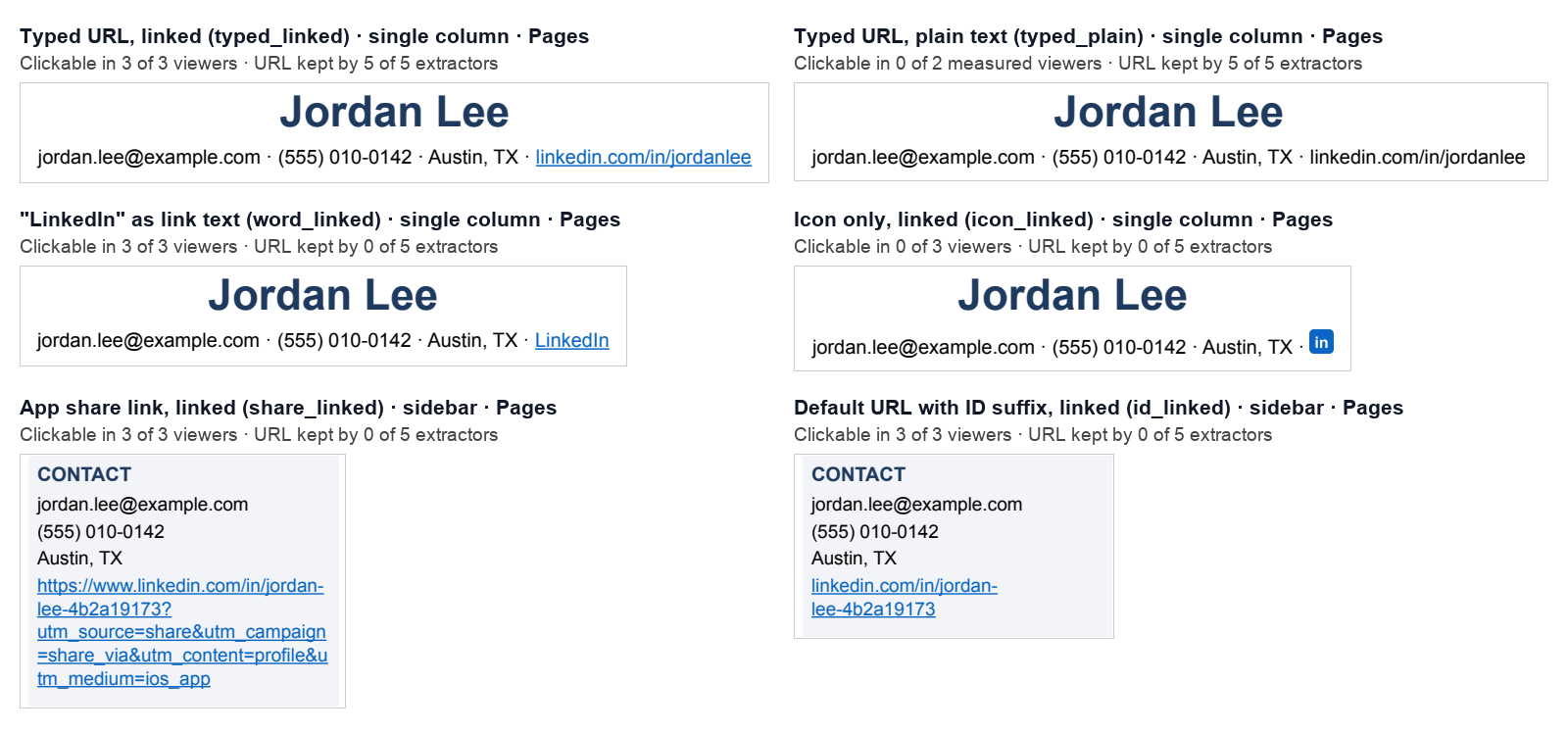
What the PDFs look like. Real renders of the contact area from six of the Pages PDFs:
Limits:
- 4 PDFs per format, from one design. Every result is what happened in these files, not a rate you’d see across all resumes. A wider sidebar, a smaller font or a different template moves the line breaks.
- No Word, Google Docs or Canva exports (Word wouldn’t save; Docs and Canva need an account). For those, follow their help pages and the 30-second test at the end of this guide.
- Real applicant tracking systems may also read link annotations, rejoin wrapped lines or re-scan the page. Ours didn’t, so treat the parser results as the cautious case.
- Edge isn’t covered. Its built-in PDF reader now uses Adobe’s engine, not PDFium.
Download the results (CSV), with one row per PDF, all 28 test PDFs (ZIP) to open in your own viewer, or the analysis script.
What should your LinkedIn URL look like on a resume?
Short, typed out in full, and with the link behind it. Here are the common formats, in the order we’d pick them based on the test:
On one line under your name, it looks like this:
jordan.lee@example.com · (555) 010-0142 · Austin, TX · linkedin.com/in/jordanlee
In a sidebar, give it its own line, and make sure it fits on that line at your font size. The fixer below checks that for you.
Should you put LinkedIn on your resume?
Yes, if your profile is current, public and matches your resume. Recruiters look. In Jobvite’s 2020 survey of 802 US recruiters, 72% used or planned to use LinkedIn for recruiting, down from 92% in 2017. In its 2016 survey, 87% of recruiting and HR professionals said they find LinkedIn most effective when vetting candidates. Both are surveys by a recruiting-software company and a few years old, so read them as a sign that recruiters check LinkedIn, not as a current rate.
A link to an empty profile doesn’t help. In a 2018–19 field experiment by ResumeGo, a resume-writing service, resumes that linked to a bare-bones profile got slightly fewer callbacks than resumes with no LinkedIn at all (7.2% vs 7.9%), while a full profile did best. It’s a vendor study, so read it as a caution, not a rule: fill in your headline, about section and experience before you link to it.
Leave it off if your profile is blank, out of date, or tells a different story from your resume (different titles or dates). Fix the profile first, then add the link.
Should you hyperlink your LinkedIn URL?
Yes, but hyperlink the URL itself, not a word. A real link is what makes it clickable in every viewer we tested, and the URL as visible text is what makes it readable by everything else. You need both.
It doesn’t matter much what color it is. The link lives in the file, not in the blue underline, so you can style it to match your other contact details if you prefer.
Where should LinkedIn go on a resume?
In your contact details at the top, next to your email and phone, as normal text. That’s where recruiters look for ways to reach you, and where parsers look for contact details. Two things to avoid:
- Don’t put it in Word’s header or footer area, or in a text box. Greenhouse lists contact details in a header, footer or text box as a cause of failed parses. Type your name and contact line into the body of the page instead.
- Watch narrow sidebars. Greenhouse also lists columned layouts as a parse risk, and in our test the sidebar is where long URLs wrapped and broke. If your template has a sidebar, keep the URL short enough to fit on one line there.
Have GitHub or a portfolio too? Put them on the same line or the next one, written the same way: github.com/yourname, linked to the full address. Printing for a career fair? See when a QR code on a resume helps and how big to print it. For any other link, the checker in our guide to sharing your resume as a link cleans it the same way.
Why isn’t the LinkedIn link on my resume working?
Click it in the exported PDF, not in your editor, then match what you see:
- Nothing happens when you click it. There’s no link behind the text, and it doesn’t start with
https://orwww.. Fix: select the text, add a link (⌘K/Ctrl+K) tohttps://www.linkedin.com/in/yourname. - It works in Word but not in the PDF. In Word for Mac, the Best for printing export may not convert hyperlinks. Fix: save as PDF again and pick the Online Service option instead (Microsoft says it may swap fonts it can’t license), then click the link in the new file.
- It works in Canva but not in the PDF. Canva links don’t survive flattened PDFs, or PNG and JPG downloads. Fix: download as PDF with Flatten PDF turned off.
- The icon doesn’t do anything. Some apps drop links from pictures (Pages did in our test). Fix: replace the icon with the typed URL, linked.
- It opens the wrong page or someone else’s profile. The URL wrapped onto two lines, or extra characters slipped in. Fix: use a short custom URL that fits on one line, and run it through the fixer below.
- It says Profile Not Found. You changed your custom URL, and LinkedIn only keeps an old one linked to you for six months unless you unlink it. Fix: update the resume to your current URL.
- It asks recruiters to sign in, or shows very little. Signed-out visitors see a simplified public profile. Fix: in your public profile settings, choose which sections are public, then check it in a private window.
How to find, clean and add your LinkedIn URL
1. Find your URL. On a computer, click Me, then View Profile. It’s under Public profile & URL, starting with www.linkedin.com/in/. In the app, tap your profile photo, then tap it again, tap the More icon next to Add section, then Contact info. Your URL is under Your Profile (LinkedIn Help). Don’t use the link from the Share button: it adds tracking codes.
2. Claim a short custom URL, once. Next to Public profile & URL, choose Edit your custom URL. LinkedIn’s rules: 3 to 100 characters, no spaces, symbols or the word “LinkedIn”, and it isn’t case-sensitive. You can change it up to five times in six months, but an old URL only stays linked to you for six months, so pick one before you send resumes and keep it.
3. Clean it and check it fits. Paste any version of your link here, including the one from the app’s Share button:
LinkedIn link fixer
Runs in your browser. Nothing is sent anywhere.
Select the text in Word, Google Docs, Pages or Canva, add a link (⌘K or Ctrl+K in most apps) and paste line 2. Paste line 2 into the application's LinkedIn field too.
The rules the fixer applies
- Keep only
linkedin.com/in/yourname. Delete everything after it:?utm_source=…codes from the app's Share button,/details/…page paths and the trailing slash. - Use
www.linkedin.com, notm.or a country prefix likeca.. - Type
linkedin.com/in/yournameon the page and link it tohttps://www.linkedin.com/in/yourname. - A
lnkd.inlink or a/company/page isn't your profile link. Copy it from your profile instead. - Numbers at the end (
jordan-lee-4b2a19173)? Claim a custom URL, and do it before you send resumes.
4. Add the link in your app. Type the short URL, select it, then:
- Word: Insert, then Link (or
⌘K/Ctrl+K), and paste the full URL into the Address box (Microsoft). On a Mac, if the link doesn’t work in your PDF, save as PDF again with the Online Service option instead of Best for printing. - Google Docs: Insert, then Link, with the full URL in the Link field (Google). Then File, Download, PDF.
- Pages: Control-click the text, Add Link, Webpage. Keep the short URL in Display and the full URL in Link (Apple). In our test, Pages kept 8 of 10 links, losing only the icon’s.
- Canva: select the text, choose the link button, paste the full URL, and download as PDF without flattening (Canva).
Do
- Show
linkedin.com/in/yournameand link it to the fullhttps://www.address - Keep it on one line, in the body of the page, next to your email and phone
- Click it in the exported PDF before you send it
- Paste the full link into the application’s LinkedIn field too
Don’t
- Link only the word “LinkedIn”, your name or an icon
- Paste the Share button link with
?utm_codes - Put it in Word’s header or footer area or a text box
- Change your custom URL while resumes with the old one are out there
Nothing worth linking to yet? A quick fix
A link only helps if what it opens helps. If your profile is thin, give it twenty minutes before you add the URL:
- Write the top of the profile. A headline that says what you do or want to do, and a short about section in your own words.
- Match your resume. Same job titles, employers and dates, so nothing looks off when a recruiter compares them.
- Make it public. In your public profile settings, turn on the sections you want signed-out visitors to see.
- Claim your custom URL (step 2 above), then open it in a private window to see what recruiters see.
LinkedIn isn’t the only place your link can point. Here’s how the common options compare:
| Where the link goes | Good for | Cost | Watch out |
|---|---|---|---|
| LinkedIn profile | Every applicant; recruiters know the format | Free | LinkedIn’s layout, and signed-out visitors see a simplified version |
| GitHub profile | Developers with real, pinned projects | Free | An empty profile hurts more than none |
| A site builder (Google Sites, Carrd and similar) | A portfolio or projects page you design yourself | Free tiers, paid custom domains | You build and maintain the layout |
| AboutStack | Your resume as a website at yourname.aboutstack.com, with your LinkedIn, projects and work on one short link | 7-day free trial, no card required, then $5.99/month | The page goes offline if the trial ends without a payment method |
Most people should have the LinkedIn link either way. A resume website is for showing what one page and a profile can’t: projects and work samples, on one short link.
Before you send your next resume, run the 30-second test: open the exported PDF in Chrome and click your LinkedIn link. Then select all the text, copy it and paste it into a plain text editor. If the link opens your profile and linkedin.com/in/yourname shows up unbroken in the pasted text, every reader we tested would have found it too.
FAQ
Should I put my LinkedIn URL on my resume?
Yes, if your profile is current, matches your resume and is set to public. Put it in your contact line next to your email and phone. If your profile is nearly empty, fix that first or leave it off. A thin profile gives a recruiter nothing more than the resume already did.
Should I include https://www. in my LinkedIn URL on my resume?
Not in the text people see. Type linkedin.com/in/yourname, then put the full https://www.linkedin.com/in/yourname in the link behind it. If you can’t add a real link, type the full https://www. version instead: Chrome and Firefox only turn plain text into a link when it starts with https:// or www.. In our test, plain linkedin.com/in/… with no link behind it was clickable in Chrome in 0 of 4 PDFs, and in Firefox in 0 of 4.
Is it OK to hyperlink just the word “LinkedIn”?
For clicks, yes. For everything else, no. The word “LinkedIn” as a link was clickable in all 4 of its PDFs, but none of our 5 text extractors found the URL in any of them, and a printed copy just says “LinkedIn”. Make the visible text the URL itself.
Do applicant tracking systems remove hyperlinks?
None of the vendor documentation we found says so. What vendors do document is that they read your resume’s text, that contact details in a header, footer or text box can cause failed parses (Greenhouse), and that LinkedIn gets its own field on the application. So assume software reads the visible text, and make sure your URL is in it.
How do I find my LinkedIn URL on the app?
Tap your profile photo, then tap it again to open your profile. Tap the More icon next to Add section, then Contact info. Your URL is under Your Profile. Use that one, not the link from the Share button, which adds tracking codes.
Can I change my LinkedIn URL after I’ve sent my resume?
You can, but the resumes you’ve already sent will point to the old one. LinkedIn keeps an old custom URL linked to you for six months unless you unlink it, and after that visitors may see a Profile Not Found page. Pick your custom URL once, before you start applying.
What do recruiters see if they aren’t signed in to LinkedIn?
Your public profile, which LinkedIn calls a simplified version of your profile, and LinkedIn says visitors may need to sign in to see all of it. You choose which sections are public in your public profile settings. Open your link in a private browser window to see what they see.
Do the same rules apply to GitHub and portfolio links?
Yes. Type the short address (github.com/yourname, yourname.com), link it to the full https:// version, keep it on one line, and test the exported PDF. The link format matters more than the site.
Sources
- Link survival test: 28 resume PDFs, 644 checks, Oct 25, 2026 (AboutStack, data download) Our dataset. One row per PDF: app, link format, layout, whether each viewer can click it, whether each text extractor kept the URL, and what a parser pulled out.
- Link survival test: all 28 test PDFs (AboutStack, ZIP) The exported PDFs, so you can open them in your own viewer.
- Link survival test: the analysis script (AboutStack, Python) The script that ran every check, with each engine’s version and rule in the code.
- Website-field study: 60 US application forms, Oct 11, 2026 (AboutStack) How many application forms have their own LinkedIn field.
- LinkedIn Help: Manage your public profile URL (2026) Custom URLs are 3 to 100 characters, case-insensitive, can change five times in six months; an old URL stays linked to you for six months unless you unlink it.
- LinkedIn Help: Find your LinkedIn public profile URL (2026) Where the URL is on desktop and in the app, and that it doesn’t appear if your public profile is off.
- LinkedIn Help: LinkedIn public profile visibility (2026) Signed-out visitors see a simplified public profile and may need to log in to see the full one.
- Microsoft Support: Save or convert to PDF or XPS in Office desktop apps (2026) In Word for Mac, Best for printing may not convert hyperlinks (a known issue); the online-service option substitutes fonts Microsoft can’t license.
- Microsoft Support: Create or edit a hyperlink (2026) Insert > Link sets the address behind any text; Word also links a typed address like www.contoso.com when you press Space or Enter.
- Apple Support: Link to a webpage, email, phone number, or page in Pages on Mac (2026) Pages has separate Display and Link fields, so the visible text and the address behind it can differ.
- Google Docs Editors Help: Work with links & bookmarks (2026) Insert > Link, with separate Text and Link fields.
- Google Docs Editors Help: Create, view, or download a file (2026) File > Download > PDF. The page says nothing about whether links survive, so test the file.
- Canva Help: Add hyperlinks (2026) Links only work in PDF downloads, except flattened PDFs; never in PNG or JPG.
- Greenhouse Support: Unsuccessful resume parse (2026) Contact details in a header, footer or text box, plus graphics, tables and columns, can cause failed or partial parses.
- Greenhouse Support: Access candidate attachments (2026) The hiring team can open the resume file itself on the candidate profile.
- Greenhouse Support: Bulk download and print resumes (2026) Resumes can be compiled into one PDF for printing, where only the visible text counts.
- Ashby Knowledge Base: Application Forms (2026) LinkedIn URL answers on the application form are auto-filled onto the candidate’s profile.
- Jobvite: Recruiter Nation Report (2016) 87% of 1,600 recruiting and HR professionals found LinkedIn most effective for vetting candidates (July 2016 survey; Jobvite sells recruiting software).
- Jobvite: Recruiter Nation Survey (2020) 72% of 802 US recruiters used or planned to use LinkedIn for recruiting, down from 92% in 2017.
- ResumeGo: How LinkedIn affects the interview chances of job applicants (2019) A resume-writing service’s field experiment: a link to a bare-bones profile did no better than no link (7.2% vs 7.9% callbacks). Vendor study.
- mozilla/pdf.js: Enable automatic URL linking, PR #19110 (2025) Firefox’s PDF viewer started turning plain-text URLs into links in 2025.
- mozilla/pdf.js: autolinker.js Plain text only becomes a link if it starts with http(s)://, www. or mailto:.
- PDFium: cpdf_linkextract.cpp (the engine in Chrome’s PDF viewer) Chrome’s viewer only detects plain-text links that contain http(s):// or start with www.